A production grade NoSQL database.
Can be distributed across servers, nodes, etc.
Replication of database is supported for high degree of redundancy and speed.
Uses CQL, a subset of SQL for querying.
Works seamlesly together with Spark and its corresponding distributed structure.
Installation of Cassandra is explained in the Installation chapter.
Spinning up a local Cassandra instance
In a terminal, first time:docker run --name my_cassandra -p 9042:9042 cassandra:latest
... and later:docker start my_cassandra
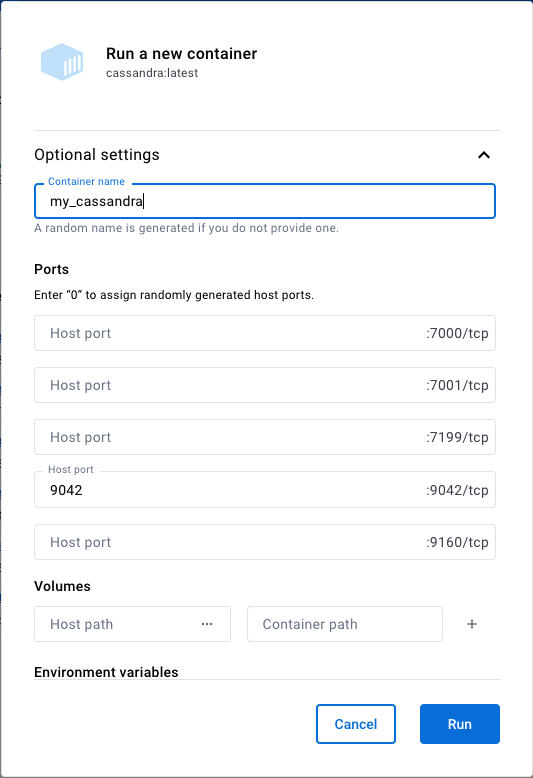
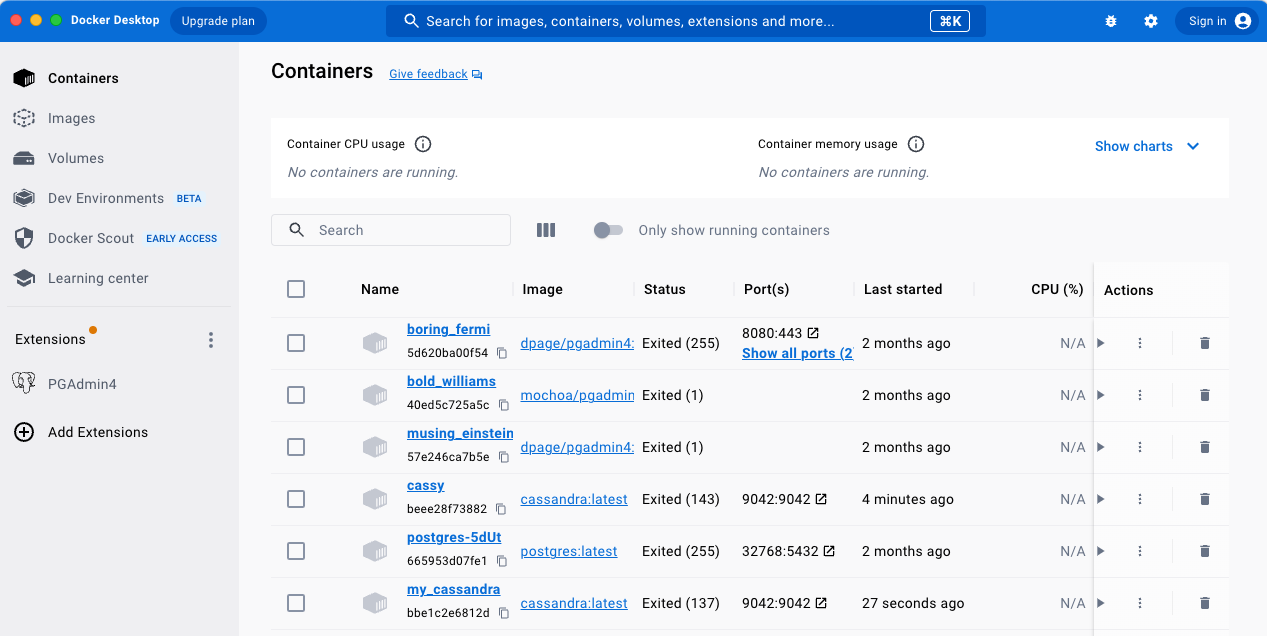
.. or in Docker Desktop:
Run the cassandra docker image with optional settings, opening 9042 port and setting a name.
Later, simply run the container with the name you chose.
Connect to the Cassandra cluster from Python.
# Connecting to Cassandra
from cassandra.cluster import Cluster
cluster = Cluster(['localhost'], port=9042)
session = cluster.connect()Keyspace
In Cassandra database tables are stored in keyspaces (basically a distributed database).
These have parameters controlling their distribution on nodes/servers and redundancy.
We will use the simplest form locally.
# Set up new keyspace (first time only)
#                                              name of keyspace                        replication strategy           replication factor
session.execute("CREATE KEYSPACE IF NOT EXISTS my_first_keyspace WITH REPLICATION = { 'class' : 'SimpleStrategy', 'replication_factor' : 1 };")
Create a table
IF NOT EXISTS makes sure we do not overwrite existing tables
# Create a new table (first time only)
session.set_keyspace('my_first_keyspace')
session.execute("DROP TABLE IF EXISTS my_first_keyspace.my_first_table;") # Starting from scratch every time
session.execute("CREATE TABLE IF NOT EXISTS my_first_table (ind int PRIMARY KEY, company text, model text);")
Inserting and reading data
# Insert some data (ind is the primary key, must be unique)
session.execute("INSERT INTO my_first_table (ind, company, model) VALUES (1, 'Tesla', 'Model Y');")
session.execute("INSERT INTO my_first_table (ind, company, model) VALUES (2, 'Tesla', 'Model 3');")
session.execute("INSERT INTO my_first_table (ind, company, model) VALUES (3, 'Polestar', '3');")
# Query the data
rows = session.execute("SELECT * FROM my_first_table;")
for i in rows:
print(i)Case sensitivity
Cassandra is by default case insensitive in column names.
To use column names with capital letters, use double quotation marks both when creating tables and when inserting data.
The effect of insensitivity may be surprising.
Look carefully at the use of quotation marks and error message below.
session.set_keyspace('my_first_keyspace')
session.execute("DROP TABLE IF EXISTS my_first_keyspace.case_insensitive;") # Starting from scratch every time
session.execute("CREATE TABLE IF NOT EXISTS case_insensitive (Capital int PRIMARY KEY, Letters text, Everywhere text);")
session.execute("DROP TABLE IF EXISTS my_first_keyspace.case_sensitive;") # Starting from scratch every time
session.execute("CREATE TABLE IF NOT EXISTS case_sensitive (\"Capital\" int PRIMARY KEY, \"Letters\" text, \"Everywhere\" text);")
session.execute("INSERT INTO case_insensitive (Capital, Letters, Everywhere) VALUES (1, 'Tesla', 'Model S');")session.execute("INSERT INTO case_sensitive (Capital, Letters, Everywhere) VALUES (1, 'Tesla', 'Model S');")session.execute("INSERT INTO case_sensitive (\"Capital\", \"Letters\", \"Everywhere\") VALUES (1, 'Tesla', 'Model S');")# Query the data
rows = session.execute("SELECT * FROM case_insensitive;")
for i in rows:
print(i)
rows = session.execute("SELECT * FROM case_sensitive;")
for i in rows:
print(i)Asyncronous writing
If your application is very data intensive, waiting for a response is not productive.
Writing asyncronously sends the data but does not pause for reply.
session.execute_async("INSERT INTO my_first_table (ind, company, model) VALUES (5, 'Volkswagen', 'ID.3');")# Query the data
rows = session.execute("SELECT * FROM my_first_table;")
for i in rows:
print(i)# More specific query
prepared_statement = session.prepare("SELECT * FROM my_first_table WHERE company=? ALLOW FILTERING;")
teslas = session.execute(prepared_statement, ['Tesla'])
for i in teslas:
print(i)Cassandra filtering
Cassandra is inherently a distributed production database. Selecting as above may require downloading all data from a node, then filtering based on the WHERE part (only PRIMARY KEYs are centrally known). Solutions:
If the table is small or most of the data will satisfy the query, add
ALLOW FILTERINGat the end of the query (not recommended if not known).Or make sure the WHERE clause points to one of the keys (see below).
# Create a new table (observe keys)
session.execute("DROP TABLE IF EXISTS my_first_keyspace.car_table;")
session.execute("CREATE TABLE IF NOT EXISTS car_table (company text, model text, PRIMARY KEY(company, model));")
# Insert some data (combination of company and model must be unique)
session.execute("INSERT INTO car_table (company, model) VALUES ('Tesla', 'Model S');")
session.execute("INSERT INTO car_table (company, model) VALUES ('Tesla', 'Model 3');")
session.execute("INSERT INTO car_table (company, model) VALUES ('Polestar', '3');")
session.execute("INSERT INTO car_table (company, model) VALUES ('Volkswagen', 'ID.4');")# More specific query now works
prepared_statement = session.prepare("SELECT * FROM car_table WHERE company=?;")
teslas = session.execute(prepared_statement, ['Tesla'])
for i in teslas:
print(i)Partitions
Cassandra databases are usually replicated over different nodes.
Data is stored in partitions (subsets) which have local copys.
The primary key, e.g., PRIMARY KEY(company, model), is used in partitioning.
The first part, e.g., company, is most important.
All cars from a company will be located together, aiming for quicker queries.
Unique IDs
In MySQL one could use the attribute AUTO_INCREMENT on integer IDs to automatically make a new unique index when inserting data.
This would cause unreasonable overhead in a distributed database.
UUIDs are used instead.
Universally Unique Identifiers are typically 128-bit random bit sequences with extremely low probability of duplication.
Cassandra uses a timeuuid type to combine a timestamp and uuid in one.
# Create a new table (first time only)
session.set_keyspace('my_first_keyspace')
session.execute("DROP TABLE IF EXISTS my_first_keyspace.table_with_uuid;")
session.execute("CREATE TABLE IF NOT EXISTS table_with_uuid (id timeuuid PRIMARY KEY, company text, model text, price float);")
session.execute("INSERT INTO table_with_uuid (id, company, model, price) VALUES (now(), 'Tesla', 'Model S', 20000.0);")
session.execute("INSERT INTO table_with_uuid (id, company, model, price) VALUES (now(), 'Tesla', 'Model S', 21000.0);")
session.execute("INSERT INTO table_with_uuid (id, company, model, price) VALUES (now(), 'Oldsmobile', 'Model 6C', 135000.0);")from cassandra.util import datetime_from_uuid1
# Query the data
rows = session.execute("SELECT * FROM table_with_uuid;")
for i in rows:
print(i)
# Extract the timestamp from Cassandra's timeuuid
print("Datetime:", datetime_from_uuid1(i.id))Exercise
Assume that the Tesla Model S cars have been scrapped, while two new cars should replace them in the database: a Koenigsegg Jesko Absolut ($3,000,000) and Bugatti Bolide (€4,000,000). The currency in the database is not defined, but we will assume it is in Great British Pounds. Convert currencies and update the database.
Note that all record writing with Cassandra is primary key based, including deletion of records.Read all cars from the database, insert the data into a Pandas DataFrame and make a barplot of the prices.
import json
with open('../3_APIs/downloads/forecast.json', 'r') as f:
    forecast = json.load(f)
# Inspect JSON file
forecast.__str__()Raw JSON
A simple, but not very efficient way of storing JSON data is to treat it as a text and save it directly to the database.
More efficient, with regard to transfer, is to compress the JSON data to a blob first.
Compression is automatic.
# Create a new table which treats the whole JSON as a blob, using the city id and the first dt as keys
session.set_keyspace('my_first_keyspace')
session.execute("DROP TABLE IF EXISTS my_first_keyspace.forecast_table;")
session.execute("CREATE TABLE IF NOT EXISTS forecast_table (city_id int, dt int, forecast blob, PRIMARY KEY(city_id, dt));")
Insert the forecast data into the table as text blob
session.execute("INSERT INTO forecast_table (city_id, dt, forecast) VALUES (%s, %s, textAsBlob(%s));", (forecast['city']['id'], forecast['list'][0]['dt'], forecast.__str__()))# Query the data
forecast_rows = session.execute("SELECT * FROM forecast_table;")
print(forecast_rows.one()) # <- only one row